
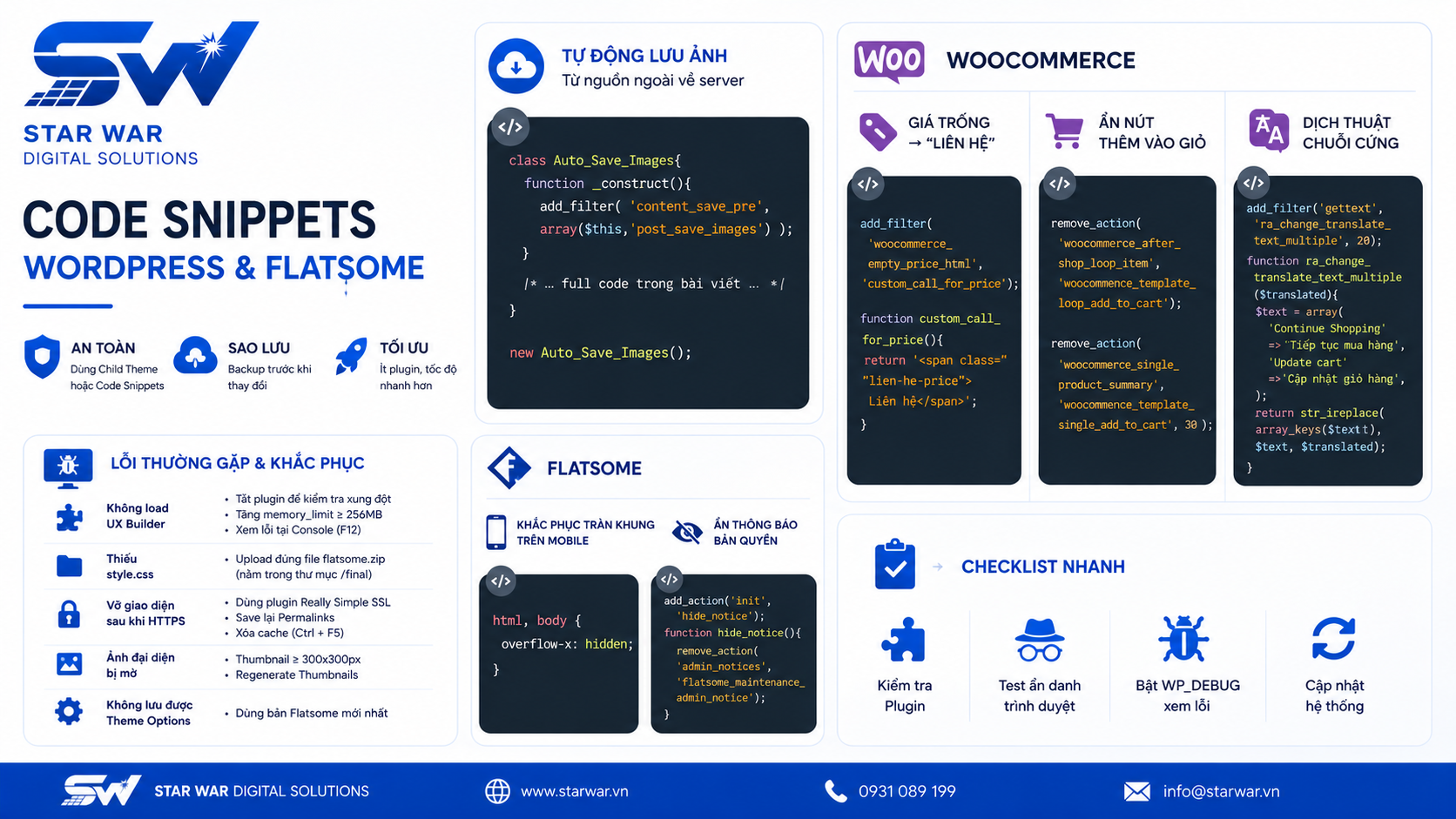
Trong quá trình vận hành và tối ưu hóa website WordPress, việc tùy chỉnh tính năng là nhu cầu tất yếu. Thay vì phụ thuộc vào các plugin cồng kềnh làm chậm tốc độ tải trang, việc sử dụng các đoạn code snippet trực tiếp vào file functions.php là giải pháp tối ưu, giúp website gọn nhẹ và linh hoạt hơn. Tại STAR WAR Digital Solutions, chúng tôi tổng hợp các đoạn code thông dụng, hiệu quả và an toàn để bạn chủ động kiểm soát website của mình.
Lưu ý quan trọng trước khi thực hiện
Để đảm bảo tính ổn định và tránh mất dữ liệu khi cập nhật giao diện, bạn cần tuân thủ các nguyên tắc sau:
- Sử dụng Child Theme: Tuyệt đối không chỉnh sửa trực tiếp trên file của theme gốc. Mọi thay đổi sẽ bị ghi đè khi theme cập nhật.
- Sử dụng Plugin Code Snippets: Nếu bạn không chuyên về kỹ thuật, hãy cài đặt plugin Code Snippets. Nó cho phép quản lý, bật/tắt các đoạn code mà không cần can thiệp trực tiếp vào file hệ thống.
- Backup dữ liệu: Luôn sao lưu file
functions.phptrước khi thực hiện bất kỳ thay đổi nào.
Các đoạn code tối ưu cho WordPress
Tự động lưu ảnh từ nguồn ngoài về server
Đoạn code này giúp bạn bảo vệ nội dung bằng cách tự động tải ảnh từ link bên ngoài về server của bạn khi đăng bài, tránh tình trạng lỗi ảnh nếu nguồn gốc xóa file.
class Auto_Save_Images{
    function __construct(){
        add_filter( 'content_save_pre',array($this,'post_save_images') );
    }
    function post_save_images( $content ){
        if( ($_POST['save'] || $_POST['publish'] )){
            set_time_limit(240);
            global $post;
            $post_id=$post->ID;
            $preg=preg_match_all('/<img.*?src="(.*?)"/',stripslashes($content),$matches); if($preg){ foreach($matches[1] as $image_url){ if(empty($image_url)) continue; $pos=strpos($image_url,$_SERVER['HTTP_HOST']); if($pos===false){ $res=$this->save_images($image_url,$post_id);
                        $replace=$res['url'];
                        $content=str_replace($image_url,$replace,$content);
                    }
                }
            }
        }
        remove_filter( 'content_save_pre', array( $this, 'post_save_images' ) );
        return $content;
    }
    function save_images($image_url,$post_id){
        $file=file_get_contents($image_url);
        $post = get_post($post_id);
        $posttitle = $post->post_title;
        $postname = sanitize_title($posttitle);
        $im_name = "$postname-$post_id.jpg";
        $res=wp_upload_bits($im_name,'',$file);
        $this->insert_attachment($res['file'],$post_id);
        return $res;
    }
    function insert_attachment($file,$id){
        $dirs=wp_upload_dir();
        $filetype=wp_check_filetype($file);
        $attachment=array(
            'guid'=>$dirs['baseurl'].'/'. _wp_relative_upload_path($file),
            'post_mime_type'=>$filetype['type'],
            'post_title'=>preg_replace('/\.[^.]+$/','',basename($file)),
            'post_content'=>'',
            'post_status'=>'inherit'
        );
        $attach_id=wp_insert_attachment($attachment,$file,$id);
        $attach_data=wp_generate_attachment_metadata($attach_id,$file);
        wp_update_attachment_metadata($attach_id,$attach_data);
        return $attach_id;
    }
}
new Auto_Save_Images();
Tùy chỉnh WooCommerce
Chuyển giá trống thành nút "Liên hệ"
add_filter('woocommerce_empty_price_html', 'custom_call_for_price');
function custom_call_for_price() {
    return '<span class="lien-he-price">Liên hệ</span>';
}
Ẩn nút "Thêm vào giỏ hàng" (Chế độ Catalogue)
remove_action( 'woocommerce_after_shop_loop_item', 'woocommerce_template_loop_add_to_cart');
remove_action( 'woocommerce_single_product_summary', 'woocommerce_template_single_add_to_cart', 30 );
Dịch thuật các chuỗi văn bản cứng đầu
add_filter( 'gettext', 'ra_change_translate_text_multiple', 20 );
function ra_change_translate_text_multiple( $translated ) {
    $text = array(
        'Continue Shopping' => 'Tiếp tục mua hàng',
        'Update cart'       => 'Cập nhật giỏ hàng',
    );
    $translated = str_ireplace( array_keys($text), $text, $translated );
    return $translated;
}
Tùy chỉnh chuyên sâu cho Flatsome
Khắc phục lỗi tràn khung trên Mobile
Thêm vào phần Custom CSS của theme:
html, body { overflow-x: hidden; }
Ẩn thông báo đăng ký bản quyền của Flatsome
add_action( 'init', 'hide_notice' );
function hide_notice() {
    remove_action( 'admin_notices', 'flatsome_maintenance_admin_notice' );
}
Kết luận
Việc sử dụng các đoạn code tùy chỉnh giúp bạn kiểm soát website mà không cần cài đặt quá nhiều plugin gây nặng hệ thống. Tuy nhiên, hãy luôn ưu tiên sự an toàn bằng cách test code trên môi trường staging trước khi áp dụng cho website chính thức.
Nếu bạn cần giải pháp tùy chỉnh chuyên sâu hoặc tối ưu hóa hiệu suất website toàn diện, đội ngũ kỹ thuật tại STAR WAR Digital Solutions luôn sẵn sàng hỗ trợ. Liên hệ với chúng tôi để được tư vấn các giải pháp kỹ thuật phù hợp nhất cho doanh nghiệp của bạn.

![[BIG SALE CUỐI NĂM] Giảm giá chào Giáng Sinh – tưng bừng đón Năm Mới 2024](https://erpsoftware.tech/uploads/blog/20260818160959-vDGC2PCh.png)