
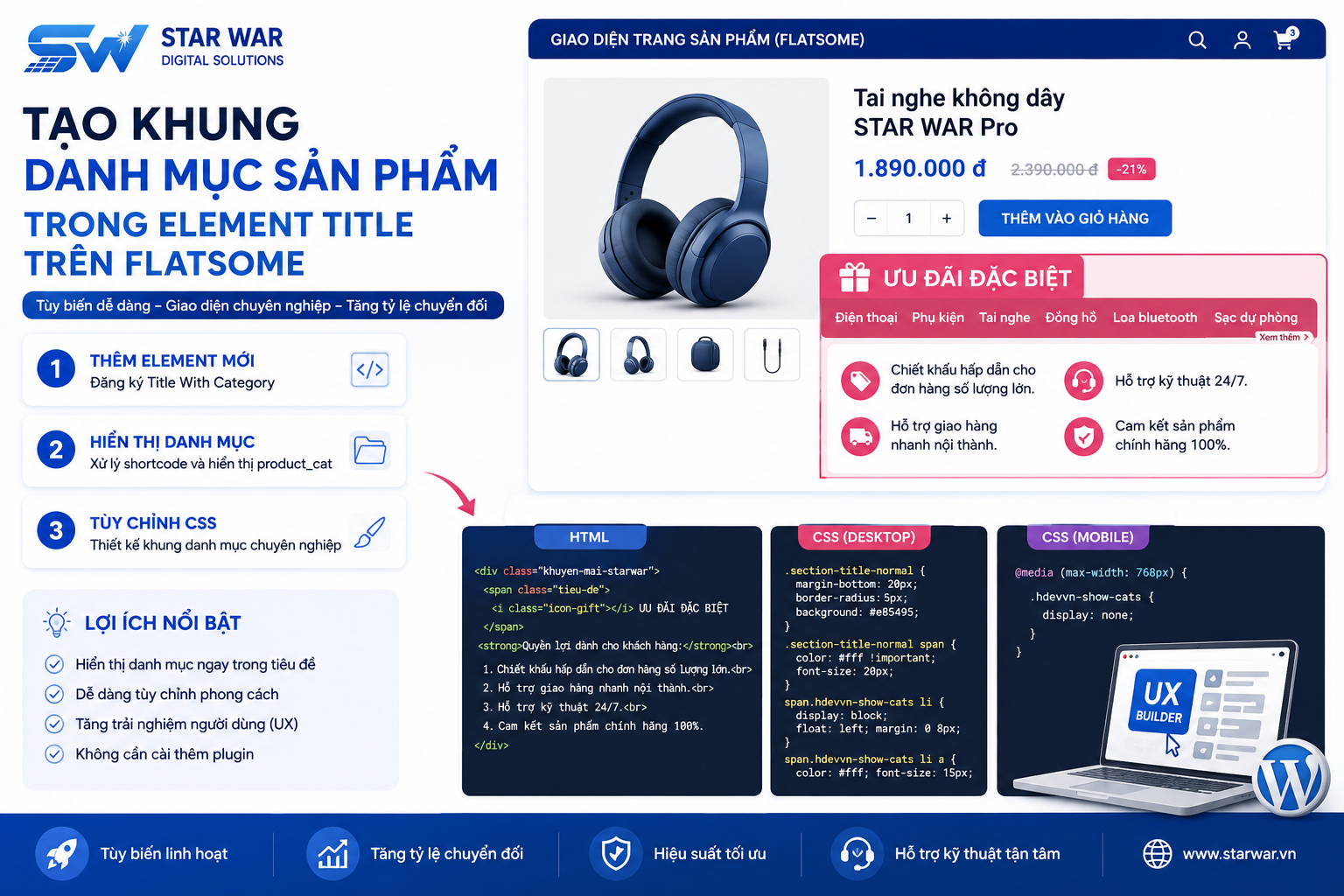
UX Builder của Flatsome là công cụ mạnh mẽ giúp tối ưu hóa trải nghiệm thiết kế giao diện. Tuy nhiên, các tùy chọn mặc định đôi khi chưa đáp ứng đủ nhu cầu điều hướng chuyên sâu. Để tối ưu hóa trải nghiệm người dùng (UX) và tăng tỷ lệ chuyển đổi, việc tích hợp danh mục con (sub-menu) trực tiếp vào Element Title là một giải pháp hiệu quả.
Tại STAR WAR Digital Solutions, chúng tôi hướng dẫn bạn cách tùy biến Element Title để hiển thị danh mục sản phẩm ngay tại tiêu đề khối, giúp khách hàng dễ dàng điều hướng mà không cần cài đặt thêm plugin cồng kềnh.
Chuẩn bị trước khi thực hiện
Để đảm bảo an toàn cho hệ thống, bạn hãy thực hiện các bước sau:
- Sao lưu (backup) website trước khi chỉnh sửa file hệ thống.
- Sử dụng Flatsome Child Theme để tránh mất cấu hình khi cập nhật theme gốc.
- Truy cập vào file
functions.phpcủa Child Theme (đường dẫn:wp-content/themes/flatsome-child/functions.php).
Bước 1: Đăng ký Element mới trong UX Builder
Đầu tiên, bạn cần khai báo một element mới với tên gọi "Title With Category" để có thể tùy chỉnh trong giao diện kéo thả của UX Builder. Dán đoạn code sau vào file functions.php:
function ttit_add_element_ux_builder(){
  add_ux_builder_shortcode('title_with_cat', array(
    'name'      => __('Title With Category'),
    'category'  => __('Content'),
    'info'      => '{{ text }}',
    'wrap'      => false,
    'options' => array(
      'ttit_cat_ids' => array(
        'type' => 'select',
        'heading' => 'Categories',
        'param_name' => 'ids',
        'config' => array(
          'multiple' => true,
          'placeholder' => 'Select...',
          'termSelect' => array(
            'post_type' => 'product_cat',
            'taxonomies' => 'product_cat'
          )
        )
      ),
      'style' => array(
        'type'    => 'select',
        'heading' => 'Style',
        'default' => 'normal',
        'options' => array(
          'normal'      => 'Normal',
          'center'      => 'Center',
          'bold'        => 'Left Bold',
          'bold-center' => 'Center Bold',
        ),
      ),
      'text' => array(
        'type'       => 'textfield',
        'heading'    => 'Title',
        'default'    => 'Lorem ipsum dolor sit amet...',
        'auto_focus' => true,
      ),
      'tag_name' => array(
        'type'    => 'select',
        'heading' => 'Tag',
        'default' => 'h3',
        'options' => array(
          'h1' => 'H1',
          'h2' => 'H2',
          'h3' => 'H3',
          'h4' => 'H4',
        ),
      ),
      'color' => array(
        'type'     => 'colorpicker',
        'heading'  => __( 'Color' ),
        'alpha'    => true,
        'format'   => 'rgb',
        'position' => 'bottom right',
      ),
      'width' => array(
        'type'    => 'scrubfield',
        'heading' => __( 'Width' ),
        'default' => '',
        'min'     => 0,
        'max'     => 1200,
        'step'    => 5,
      ),
      'margin_top' => array(
        'type'        => 'scrubfield',
        'heading'     => __( 'Margin Top' ),
        'default'     => '',
        'placeholder' => __( '0px' ),
        'min'         => - 100,
        'max'         => 300,
        'step'        => 1,
      ),
      'margin_bottom' => array(
        'type'        => 'scrubfield',
        'heading'     => __( 'Margin Bottom' ),
        'default'     => '',
        'placeholder' => __( '0px' ),
        'min'         => - 100,
        'max'         => 300,
        'step'        => 1,
      ),
      'size' => array(
        'type'    => 'slider',
        'heading' => __( 'Size' ),
        'default' => 100,
        'unit'    => '%',
        'min'     => 20,
        'max'     => 300,
        'step'    => 1,
      ),
      'link_text' => array(
        'type'    => 'textfield',
        'heading' => 'Link Text',
        'default' => '',
      ),
      'link' => array(
        'type'    => 'textfield',
        'heading' => 'Link',
        'default' => '',
      ),
    ),
  ));
}
add_action('ux_builder_setup', 'ttit_add_element_ux_builder');
Bước 2: Xử lý hiển thị danh mục
Tiếp theo, chúng ta định nghĩa cách hiển thị danh mục sản phẩm (product_cat) thông qua shortcode. Bạn vẫn dán đoạn code này vào file functions.php:
function title_with_cat_shortcode( $atts, $content = null ){
  extract( shortcode_atts( array(
    '_id' => 'title-'.rand(),
    'class' => '',
    'visibility' => '',
    'text' => 'Lorem ipsum dolor sit amet...',
    'tag_name' => 'h3',
    'sub_text' => '',
    'style' => 'normal',
    'size' => '100',
    'link' => '',
    'link_text' => '',
    'target' => '',
    'margin_top' => '',
    'margin_bottom' => '',
    'letter_case' => '',
    'color' => '',
    'width' => '',
    'icon' => '',
  ), $atts ) );
  $classes = array('container', 'section-title-container');
  if ( $class ) $classes[] = $class;
  if ( $visibility ) $classes[] = $visibility;
  $classes = implode(' ', $classes);
  $link_output = '';
  if($link) $link_output = '<a href="'.$link.'" target="'.$target.'">'.$link_text.get_flatsome_icon('icon-angle-right').'</a>';
  $small_text = '';
  if($sub_text) $small_text = '<small class="sub-title">'.$atts['sub_text'].'</small>';
  if($icon) $icon = get_flatsome_icon($icon);
  if($style == 'bold_center') $style = 'bold-center';
  $css_args = array(
   array( 'attribute' => 'margin-top', 'value' => $margin_top),
   array( 'attribute' => 'margin-bottom', 'value' => $margin_bottom),
  );
  if($width) {
    $css_args[] = array( 'attribute' => 'max-width', 'value' => $width);
  }
  $css_args_title = array();
  if($size !== '100'){
    $css_args_title[] = array( 'attribute' => 'font-size', 'value' => $size, 'unit' => '%');
  }
  if($color){
    $css_args_title[] = array( 'attribute' => 'color', 'value' => $color);
  }
  if ( isset( $atts[ 'ttit_cat_ids' ] ) ) {
    $ids = explode( ',', $atts[ 'ttit_cat_ids' ] );
    $ids = array_map( 'trim', $ids );
    $parent = '';
    $orderby = 'include';
  } else {
    $ids = array();
  }
  $args = array(
    'taxonomy' => 'product_cat',
    'include'    => $ids,
    'pad_counts' => true,
    'child_of'   => 0,
  );
  $product_categories = get_terms( $args );
  $hdevvn_html_show_cat = '';
  if ( $product_categories ) {
    foreach ( $product_categories as $category ) {
      $term_link = get_term_link( $category );
      $hdevvn_html_show_cat .= '<li class="hdevvn_cats"><a href="'.$term_link.'">'.$category->name.'</a></li>';
    }
  }
  return '<div class="'.$classes.'" '.get_shortcode_inline_css($css_args).'><'. $tag_name . ' class="section-title section-title-'.$style.'"><b></b><span class="section-title-main" '.get_shortcode_inline_css($css_args_title).'>'.$icon.$text.$small_text.'</span>
  <span class="hdevvn-show-cats">'.$hdevvn_html_show_cat.'</span><b></b>'.$link_output.'</' . $tag_name .'></div>';
}
add_shortcode('title_with_cat', 'title_with_cat_shortcode');
Bước 3: Tùy chỉnh CSS
Để giao diện hiển thị chuyên nghiệp, bạn hãy thêm đoạn mã CSS sau vào Flatsome > Advanced > Custom CSS:
.section-title-normal {
    margin-bottom: 20px;
    border-bottom: 0;
    border-radius: 5px;
    background: #e85495;
}
.section-title-normal b { display: none; }
.section-title-normal span {
    margin-right: 15px;
    padding: 10px;
    font-size: 20px;
    color: white!important;
}
span.hdevvn-show-cats li {
    display: block;
    width: auto;
    float: left;
    margin: 0 8px;
}
span.hdevvn-show-cats li a {
    font-size: 15px;
    text-transform: none;
    font-weight: 400;
    color: white;
}
.section-title a {
    font-size: 14px;
    margin-left: auto;
    color: white;
    margin-right: 10px;
}
Lưu ý: Nếu bạn muốn ẩn danh mục con trên thiết bị di động để tối ưu không gian, hãy thêm đoạn CSS này vào Custom CSS Mobile:
.hdevvn-show-cats { display: none; }
Sau khi hoàn tất, bạn có thể mở UX Builder, tìm kiếm element "Title With Category" và bắt đầu cấu hình danh mục cho các trang bán hàng của mình. Nếu bạn cần hỗ trợ kỹ thuật chuyên sâu hoặc tối ưu hóa hiệu năng website Flatsome, đừng ngần ngại liên hệ với đội ngũ STAR WAR Digital Solutions.

![[BIG SALE CUỐI NĂM] Giảm giá chào Giáng Sinh – tưng bừng đón Năm Mới 2024](https://erpsoftware.tech/uploads/blog/20260818160959-vDGC2PCh.png)